
Download the Parent App
User Manual · Manual del usuario
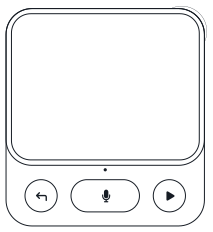
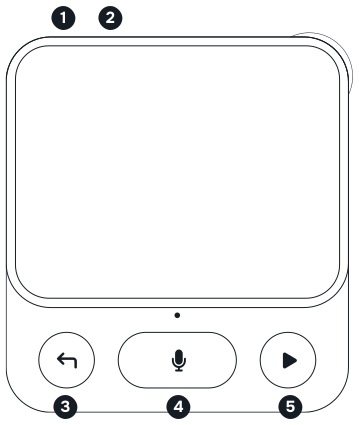
Your device — Front · Frente
-
Power · Encendido
Press: lock/unlock · Hold 5s: on/off
Presionar: bloquear/desbloquear · Mantener 5s: encender/apagar -
Restart pinhole · Orificio de reinicio
Insert a pin into the hole to restart the device.
Inserta un alfiler en el orificio para reiniciar el dispositivo. -
Back · Atrás
Return to previous screen.
Volver a la pantalla anterior. -
Record · Grabar
Hold to talk to pet, release to send.
Mantener para hablar con tu mascota, soltar para enviar. -
Menu / Select · Menú / Seleccionar
Open menu, confirm selection.
Abrir menú, confirmar selección.
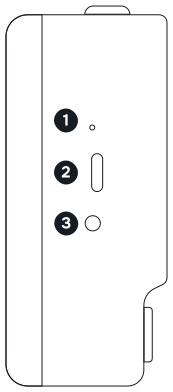
Your device — Left Side · Lado izquierdo
-
Charging LED · LED de carga
Blinks when charging, stays on when full.
Parpadea durante la carga y permanece encendido cuando la batería está completamente cargada. - USB-C charging port · Puerto de carga USB-C
- 3.5mm headphone jack · Conector para auriculares de 3,5 mm
Battery: 8–10 hours. Full charge ~2 hours via USB-C.
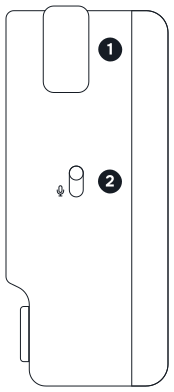
Your device — Right Side · Lado derecho
-
Scroll wheel · Rueda de desplazamiento
Scroll to navigate menus.
Desplaza la rueda para navegar por los menús. -
Mute switch · Interruptor de silencio
Switch to disconnect the microphone.
Interruptor para desconectar el micrófono.
Setup · Configuración
-
Download the parent app · Descarga la app
Visit nowaplanet.com/guide.
Visita nowaplanet.com/guide. -
Sign up + Create child profile · Regístrate + Crea el perfil del niño
Create your parent account and set up your child’s profile.
Crea tu cuenta de padre y configura el perfil de tu hijo. -
Turn on · Enciende
Long press Power 5s. If no screen, charge via USB-C first.
Mantén Power 5s. Si no enciende, carga por USB-C. -
Connect Wi-Fi · Conecta WiFi
Follow on-screen Wi-Fi setup.
Sigue instrucciones WiFi en pantalla. -
Pair · Empareja
Parent app → Parent portal → Pair new device → Scan the QR code or enter the pairing code shown on the device screen.
App → Portal de padres → Emparejar dispositivo → escanea el QR o introduce el código en pantalla. -
Hatch · ¡Eclosiona!
Your child gets a surprise egg!
¡Tu peque recibe un huevo sorpresa!
Caring for your pet · Cuidar a tu mascota
Press Select to open menu · Hold Voice to give a command.
Vital stats · Estadísticas vitales
-
Hunger · Hambre
Select → Menu → Hunger → Pick a food.
Select → Menú → Hambre → Elige comida. -
Love · Amor
Select → Menu → Love → Pick an action (hug, tickle, massage…).
Select → Menú → Amor → Elige acción. -
Shine · Brillo
Select → Menu → Shine → Pick an action (wash, brush, towel…).
Select → Menú → Brillo → Elige acción.
Situational · Aparece automáticamente
Missions & Routines · Misiones y rutinas
-
Routine missions · Misiones de rutina
Set by parents. The device reminds your child to brush teeth, do homework, get ready for bed.
Configurado por los padres. El dispositivo recuerda a tu peque cepillarse los dientes, hacer la tarea y prepararse para dormir. -
Emotional regulation missions · Misiones de regulación emocional
Guided prompts help your child name and manage how they feel.
Indicaciones guiadas ayudan a tu peque a nombrar y manejar cómo se siente. -
EF mini-games · Minijuegos EF
Voice and arcade games that build executive-function skills. 3–4× per week.
Juegos de voz y juegos de arcade que desarrollan la función ejecutiva. 3-4× por semana.
Evolution · Evolución
Consistent care leads to evolution into new forms — each unique based on how the child plays.
Growth stats · Estadísticas
-
Intelligence — grows through mini-games and missions
Inteligencia — crece con juegos y misiones -
Discipline — grows through completed routines and missions
Disciplina — crece con rutinas y misiones completadas -
Stress — increases from neglect or harsh treatment
Estrés — aumenta por descuido o trato brusco
The pet never dies. If persistently neglected, it may return to its home world — but your child will receive a new egg to try again.
Content Library · Biblioteca de contenido
As your pet levels up, it unlocks a growing library of content — each tied to collectible items your child can discover.
-
Stories — read aloud for your childCuentos narrados para tu hijo/a
-
Songs — sing alongCanciones para cantar
-
Fun facts — learn something new every dayDatos curiosos para aprender cada día
-
Ambient sounds — rain, ocean, forest for calm timeSonidos ambientales para momentos de calma
-
Podcasts — curated audio content for kidsPodcasts — contenido curado para niños
More content available via the parent app store.
What’s in the box · Contenido
- Nowa device
- USB-C charging cable
- Quick Start Card
- User Manual
- Safety Information
Missing something? Contact support@nowaplanet.com
Troubleshooting · Solución de problemas
Why is my Nowa not working? · ¿Por qué mi Nowa no funciona?
Single press Power to unlock screen. If still off, long press Power for 5 seconds to turn on.
If that doesn’t work, the battery may be empty — charge via USB-C for at least 30 minutes.
If the device is on, check the Wi-Fi icon. A warning (!) means no connection — reconnect to Wi-Fi.
If the screen shows a Pairing Code, the device isn’t paired yet — open the parent app and pair it.
How to stop audio playback? · ¿Cómo detener el audio?
When Nowa is playing audio — a story, song, podcast, or mission guide — press the Micro button once to stop and return to listening mode.
How to change the volume? · ¿Cómo cambiar el volumen?
Go to Menu → Settings → Volume to adjust.
How to connect to a different Wi-Fi? · ¿Cómo conectarse a otra red WiFi?
The device auto-connects to known networks. To switch: Menu → Settings → Wi-Fi.
Why can’t Nowa connect to my phone’s hotspot? · ¿Por qué Nowa no se conecta al punto de acceso de mi teléfono?
Nowa only connects to 2.4 GHz Wi-Fi. Switch your phone’s hotspot to 2.4 GHz, then try again.
iPhone: Settings → Personal Hotspot → turn on Maximize Compatibility.
Android: open your hotspot settings and set the band to 2.4 GHz (names vary by phone).
How to check battery level? · ¿Cómo comprobar la batería?
On screen: battery icon in top-right corner.
In the parent app: check under paired device.
LED near USB-C: Red when charging, green when fully charged.
How to set bedtime? · ¿Cómo establecer hora de dormir?
Parent app → Parental Controls → Bedtime. Set start and end time.
Pet is thinking for too long or not responding? · ¿La mascota piensa mucho o no responde?
This may be caused by a weak connection. Check the Wi-Fi icon on the top bar. If there’s a warning, go to Menu → Settings → Wi-Fi to reconnect.
Why can’t my pet hear me? · ¿Por qué mi mascota no me escucha?
Press and hold the Micro button while speaking, then release to send. If still not working, check the mute switch on the right side — make sure the device is not muted.
How to factory reset? · ¿Cómo restablecer?
Factory reset will restore the device to its original state, unpairing it and removing all content, Wi-Fi passwords, and other saved data. To perform a factory reset, go to Menu → Settings → Factory Reset.
Need more help? · ¿Necesitas más ayuda?
Parent App · App para padres
Your command center for routines, insights, and safety.
-
Set daily routines and custom missionsConfigura rutinas y misiones
-
See activity summariesVe resúmenes de actividad
-
Get weekly activity highlightsObtén resúmenes semanales
-
Set bedtime and restricted topics.Configura la hora de dormir y los temas restringidos.
Download now — scan the QR codes above or visit nowaplanet.com/guide.
Safety & Privacy Tips · Seguridad y privacidad
-
The mute switch physically disconnects the mic — use it when you want guaranteed privacy.El interruptor de silencio desconecta el micrófono físicamente.
-
Enable bedtime mode so the pet rests at night and doesn’t keep your child up.Activa el modo dormir para que la mascota descanse de noche.
-
The pet has no access to the open internet — all content is curated and age-appropriate.La mascota no tiene acceso a internet abierto — todo el contenido es curado.
-
Review activity summaries in the parent app anytime to see what your child did.Revisa los resúmenes de actividad en la app en cualquier momento.
-
If you hear something unexpected, report it in the app or email our support team — we review all flags.Si escuchas algo inesperado, repórtalo en la app o envía un correo a nuestro equipo de soporte — revisamos todos los reportes.
FCC Statement · Declaración de la FCC
FCC ID: 2BXZZ-NWP1
This device complies with part 15 of the FCC Rules. Operation is subject to the following two conditions: (1) This device may not cause harmful interference, and (2) this device must accept any interference received, including interference that may cause undesired operation.
Note: This equipment has been tested and found to comply with the limits for a Class B digital device, pursuant to part 15 of the FCC Rules. These limits are designed to provide reasonable protection against harmful interference in a residential installation. This equipment generates, uses and can radiate radio frequency energy and, if not installed and used in accordance with the instructions, may cause harmful interference to radio communications. However, there is no guarantee that interference will not occur in a particular installation. If this equipment does cause harmful interference to radio or television reception, which can be determined by turning the equipment off and on, the user is encouraged to try to correct the interference by one or more of the following measures:
- Reorient or relocate the receiving antenna.Reoriente o reubique la antena receptora.
- Increase the separation between the equipment and receiver.Aumente la distancia entre el equipo y el receptor.
- Connect the equipment into an outlet on a circuit different from that to which the receiver is connected.Conecte el equipo a un tomacorriente de un circuito distinto de aquel al que está conectado el receptor.
- Consult the dealer or an experienced radio/TV technician for help.Consulte al distribuidor o a un técnico de radio/TV con experiencia para obtener ayuda.
Note: The Grantee is not responsible for any changes or modifications not expressly approved by the party responsible for compliance. Such modifications could void the user’s authority to operate the equipment.
The device has been evaluated to meet general RF exposure requirement.
This equipment complies with FCC’s RF radiation exposure limits set forth for an uncontrolled environment. This device and its antenna(s) must not be co-located or operating in conjunction with any other antenna or transmitter.
The device can be used in portable exposure conditions without restriction.
Made for kids. Trusted by parents. Grounded in child development.
© 2026 Nowa Technologies Pte. Ltd.